Contractor website service pages, built around the customer’s problem.
A homeowner can tell you the crawl space smells damp. They usually cannot tell you whether they need encapsulation, a vapor barrier or drainage. Here is how to structure a contractor website so that person finds the right page, using the Watertight Waterproofing rebuild as the worked example.
Or call or text (502) 387-1142



Websites I have built for Kentucky businesses



















The short answer
Give every job your customers ask about its own page, put a hub above them that explains the whole range in plain language, link each service to the ones that usually come with it, back the pages with project photos labeled for what they actually show, and let the request form start with what the customer is seeing.
One page that lists ten services rarely ranks for any of them and rarely answers anyone’s question. Fifteen focused pages can do both.
Start with what the visitor can describe
Nobody searches for a service name until someone tells them that is what they need. They search because the basement floor is wet, the crawl space smells, a floor sags or a home inspector pointed at a crack.
So the structure starts there. List the problems your customers describe on the phone, then decide which page each one should land on. Often one problem leads to two or three possible kinds of work, and that is fine: the page can explain the difference and point to the others.
One page per service, and a hub above them
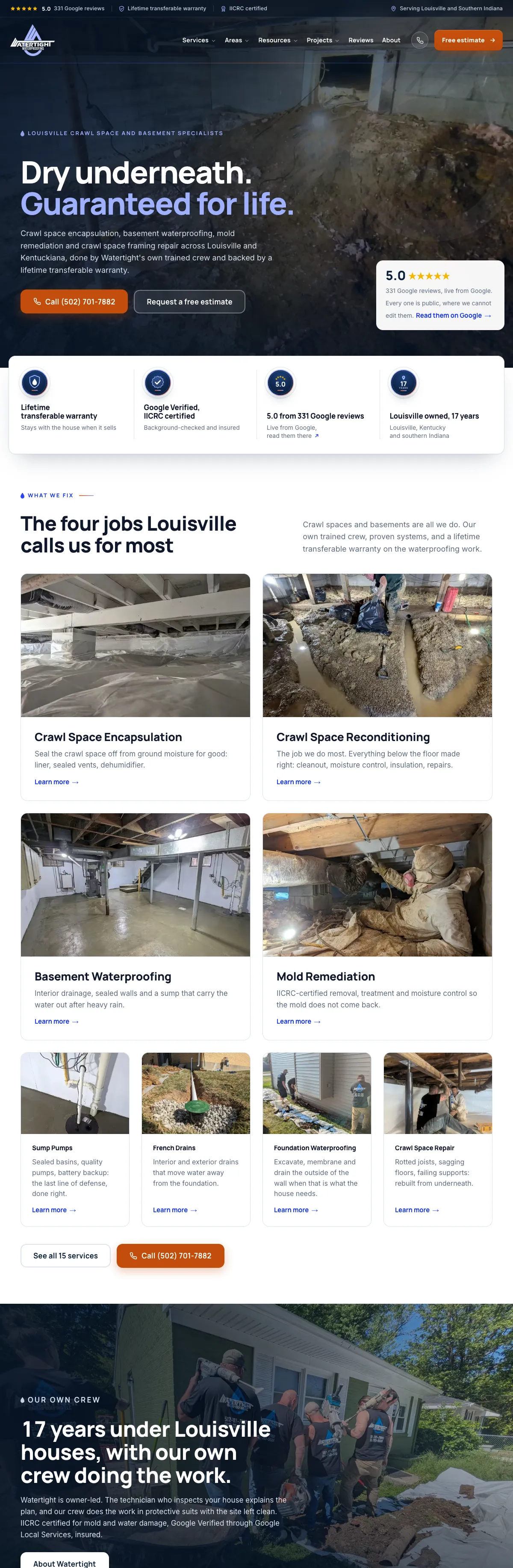
For the Watertight Waterproofing rebuild I gave each main kind of work its own page: crawl space encapsulation, reconditioning, basement waterproofing, mold remediation, sump pumps, drains, foundation waterproofing, structural repair and more, fifteen in all. A services hub sits above them and explains the whole range in a few sentences each.
The hub is for the visitor who is still unsure. The service pages are for the visitor who knows, or has just learned, what they are dealing with. Both need to exist.
What each service page needs
A service page has to do more than repeat the service name over a stock photo. In order:
- What the problem looks like, in the words a homeowner would use.
- What the work involves, step by step, and what has to be checked in person.
- Real photos of that kind of job, labeled for what they show.
- The questions people ask before they call, answered plainly.
- Related services, for the jobs that often come together.
- A clear next step: a phone number to tap and a request form one click away.
Let photos say only what they show
Project photos are the strongest proof a contractor has, and the easiest to oversell. A finished liner photo shows a finished liner. It does not prove a town, a date or a homeowner’s experience.
On the Watertight site, before and after pairs are shown only where the same job is in both photos. Supporting photos from related jobs are labeled that way. A homeowner deciding who to let under their house notices that honesty.
Start the request where the reading left off
The free estimate request on the Watertight site asks first what the homeowner is seeing, the same words the service pages use, then opens only the follow-up questions that matter for that problem. The office starts the first call with context instead of a blank message.
The same idea runs through my guide to service business request forms: ask less, ask the right things, and make it easy on a phone.
Build a structure that can keep growing
Focused pages make future content easy to place. A new sump pump question becomes a section on the sump pump page. A newly documented job links to the service it shows. A question that keeps coming up becomes a homeowner guide that links back to its service.
That is the real payoff of a good structure: every new piece of content has an obvious home, and the site keeps making sense as the business grows.
Frequently asked questions
How many service pages should a contractor website have?
One for every job customers search for or ask about by name. For a specialty contractor that is often eight to fifteen. Combine services only when customers treat them as the same job.
Should every service page have its own photos?
Yes, if you have them. Real photos of that kind of job beat stock photos, as long as each one is labeled for what it actually shows.
Do I still need a services overview page?
Yes. The hub helps visitors who do not know the right term yet, and it gives every service page a clear parent in your navigation.
Will more pages hurt my site?
Not if each page answers a different question. Thin pages that repeat each other are the problem, not the number of pages.
Can you restructure my existing contractor website?
Yes. A rebuild maps every old address to its new page so search history carries over. On the Watertight launch, every old address Google knew redirected in a single step.
Fifteen services, one hub, one crew.
This is the services hub on the Watertight Waterproofing website. Every service is listed in plain language with what it is, what it includes and where to start, and each one opens a page of its own.
The structure, the calculator behind the cost guide and the office tools are covered in the full case study.

Want your services to make sense to a homeowner?
Tell me what you do and what customers say when they call. I will sketch the page structure I would build.